When installing the target, I get the error I don’t have Visual Studio 2008 and CE compiler. Also the AXCF2152 is not in the devicelist of the installer, only RFC480 and -70. I downloaded this installer: https://www.phoenixcontact.com/online/portal/nl?productDetection=true&requestType;=webcode&uri;=pxc-oc-itemdetail:pid=2400041&tab;=5&cpn;=webcode_1955 I followed this video: https://www.youtube.com/watch?v=oI60uEzeAHA. Arne
Hi Arne, Regarding the device list in Simulink, does anything in this post help? https://www.plcnext-community.net/index.php?option=com_easydiscuss&view;=post&id;=2444&Itemid;=221⟨=en#reply-2486 Martin.
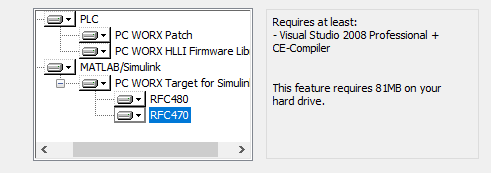
Hey Arne, unfortunatly the Video is outdated. You can disable the RFC Targets for the Installation.
Make sure to install the PLCnCLI and a register the AXC F 2152 SDK. Then you can use the Target for simulink with the AXC F 2152.
I see that those requirements go away if i dont select the both rfc targets. But now, it asks for at least: PCWorx 6.30, Matlab R2016a, simulink and Simulink Coder. I am able to run matlab and simulink R2019a. I also have installed PLCNext Engineer 2019.9. But the installer is missing them.. How can I fix this? Arne
Hi Arne, Please try deselecting all the installation components, and then continuing the installation … Martin.
Then I get: please install at least one feature… I’m using PC worx target for simulink V1.40 build 7. Is that the right one?
Hi Arne, I think that is the correct version. From the user manual (unfortunately only in German), this is what the install screen should look like: I think that you need to select the HLLI firmware library, and the Matlab/Simulink Toolchain, but nothing else. If this does not help, I will ask the developer for more information. Martin.
I don’t have the plcnext engineer part… Only the Worx, which i am not using obviously haha. See screenshot a few replies ago for my screen, it still looks likes this. So instead of Matlab → toolchain, I got → PCWorx target. I followed German classes for 6 years in the Netherlands so reading german should not give problems 
OK, I will ask the developer for an answer.
Hey,
even in 1.40 the aproach should be similar to 1.41
The HLLI firmware library is automatically installed for PLCnext controllers. The selection of the branch “PC Worx HLLI firmware library” is therefore not necessary For PLCnext controllers you must install the controller specific SDKs after installing the software add on.
I allready installed the SDK Oliver. So is that the problem? Should I uninstall the SDK first? Your screen looks more like mine than the one from Martin, but I can’t install it right now due to ‘missing Matlab R2016a + Simulink + Simulink Coder’ . I am able to use Matlab (r2019a) and simulink so how can the installer reconize that I have installed the programs? Arne
Hi, Arne, we’re just working on a short description for this installation; and right now we can see the cause for your problem. BUT: are you sure to have installed the complete MATLAB and Simulink tools? They are mentioned as requirements by our developers as follows: - MATLAB and Simulink (version R2016a … R2019a) - MATLAB Coder - Simulink Coder These requirements are checked during the installation process, and if not met, the installer doesn’t proceed. Please check that on your host system.
I could install it now and at configuration, I can select the HLLI. But at the Targets, none appear. How can I fix this?
Hi Arne, Regarding the device list in Simulink, does anything in this post help? https://www.plcnext-community.net/index.php?option=com_easydiscuss&view;=post&id;=2444&Itemid;=221⟨=en#reply-2486 Martin.
Hello Arne, The toolchain is prepared to fully support the PLCnCLI in a future version, but currently requires the PLCnCLI installation path to be on the system environment variable. This part is described in the post which is mentioned by Martin. I hope it helps. Daniel
We’re about to revise the PC Worx Target for Simulink documentation, and here are revised installation instructions for Target v1.4x. Please let us know if there is any other issue with this.
The link is exactly how I did it at the end!