Hello,
I have roughly 200 x 2152 deployed using RS UNI modules to achieve RS485 comms.
Each site suffers an RS UNI crash every few weeks, which appears to require an operating system level reboot to correct (or reinitialize the RS UNI).
I’m looking for a way to automatically achieve an OS reboot, even if only scheduled.
I did look at using Cron to run a bash script but there’s no way to run it with elevated permissions necessary to achieve a reboot.
If this is not currently supported at all, may I request it as a feature for 2026.0 firmware release?
I presently do a cold restart at 5am daily, but that is of course only restarting the PLCNext program, which is ineffective in reinitializing the RS UNI
Hello!
Using the PLCNextBase library may help you achieve the expected system behavior. Please download it from the PLCNext Store and review the corresponding help page.
There are also some hacks that allow the plcnextfirmware user to execute a reboot via the Linux shell, but this can be discussed as a next step.
BR
You have a large fleet of RS UNI devices, and it is unfortunate to hear that you are experiencing such serious issues with them. I strongly recommend contacting your local Phoenix Contact office; they can provide technical support and may escalate your case for further library improvements.
You could also share some relevant parts of your code, especially the MASTER/SLAVE initialization and error-handling sections. We can then review them and check whether any steps can be taken to improve system stability.
BR
Thanks Oleksandr,
PBCL_SysRestart achieves only a PLCNext application level cold restart, which I already use scheduled daily which restores comms via RS UNI most of the time.
I haven’t been able to recreate the cause of the RS UNI Lock up, but due to the number of sites I don’t have to wait too many days for one to lock up.
All sites run firmware 2024.6.1 (anything newer bricks the PLC sadly forcing me to do a factory reset).
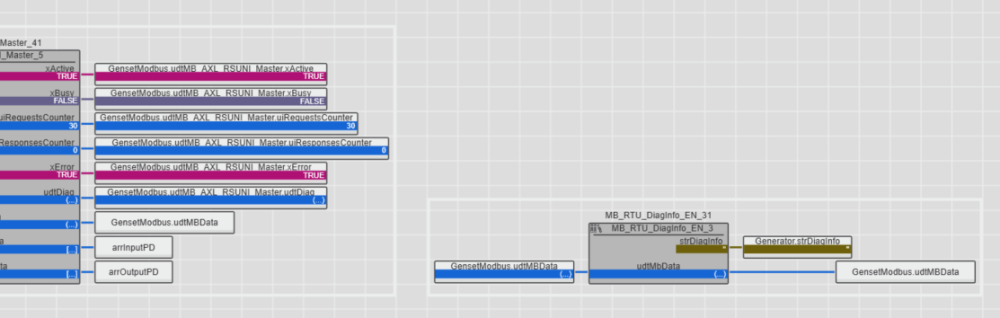
Here are some screenshots when in debug mode for a site with a locked up RS UNI (even after cold reboot):
Master Diag Code is C110 and Additional Code is 0002, pulled from the MB_RTU_Diaginfo_EN_31 instance:
Which yields Configuration Function Code error, and Function Code not Valid
I also get C100 and 0004 or Modbus Error and CRC of slave response not valid
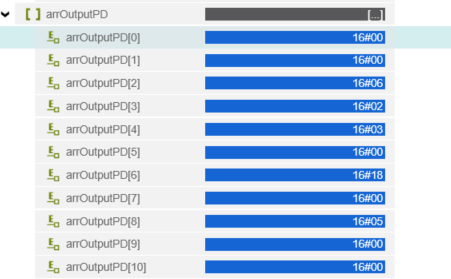
Using the watches function in PLCNext engineer I can see the data from the Master FB to the RS UNI:
00 00 06 02 03 00 18 00 05
ID 0 FC6 start add 02 end add 03 data: 00 18 CRC: 00 05 (which the CRC looks wrong)
I only have one MB_RTU_FC6 instance, which I have to modify code to be able to disable.
Of course uploading new code also restarts the PLC enough to temporarily clear the error for a few weeks, so it will be some time before I can extract more data (have to wait for the error to reappear)
Our local Phoenix contact is working through the why the RS UNI is crashing - we have confirmed the physical wiring and RS485 signals look okay.
What I’m looking for is an automated way for the PLC to self recover in the event the RS UNI does crash.
I’ve just noticed the 00 00 06 02 03 00 18 00 05 Byte stream doesn’t match up with the FC6 write I had programmed.
I also noticed this byte stream is in place even whilst comms are good and separately whether the FC6 FB was enabled or not, leading me to suspect this isn’t a modbus stream at all but something else.
PLCnext Technology from Phoenix Contact is a unique, open ecosystem for modern automation that is capable of meeting all the challenges of the IoT world.
The PLCNext shell to achieve OS reboot I am very interested in, I would like to explore that option
Based on your screenshots, I would strongly recommend switching the RS-UNI module to Transparent mode and setting xMode of the Master FB to FALSE.
In my experience, using the hardware protocol selection of the RS-UNI module in combination with this FB can lead to unpredictable issues. When the protocol handling is performed entirely by the FB (with the module in Transparent mode), the system operates much more reliably and stable.
I’m sure, that PBCL_SysRestart achieves either Warm Reboot of plc, with boot led blink, etc! Please kindly read help information about this function.
BR