I have a AXC F 2152 PLC that 2 days ago presented with all of its LEDs off except for the UL indicator on the power connector. There was no power outage reported. I couldn’t connect to it with PLCnext Engineer and wasn’t able to access the webserver (error 502: Bad Gateway), however, I was able to access the internal file system using WinSCP and copy the Output.log file:
I performed a firmware update via ssh but there was no change, afterwards I attempted a reset type 2 but the LEDs didn’t turn on in orange color as expected (see image and video attached):
after the LEDs turned off again I tried to access its internal files with WinSCP as “admin“ and the printed password in the PLC but was denied access because the password was incorrect even though I didn’t change it.
My suspicion is that this issue could be related to the internal microSD in the PLC, I will try to access it with a linux PC but I would like to hear any input or process that could help me restore the controller.
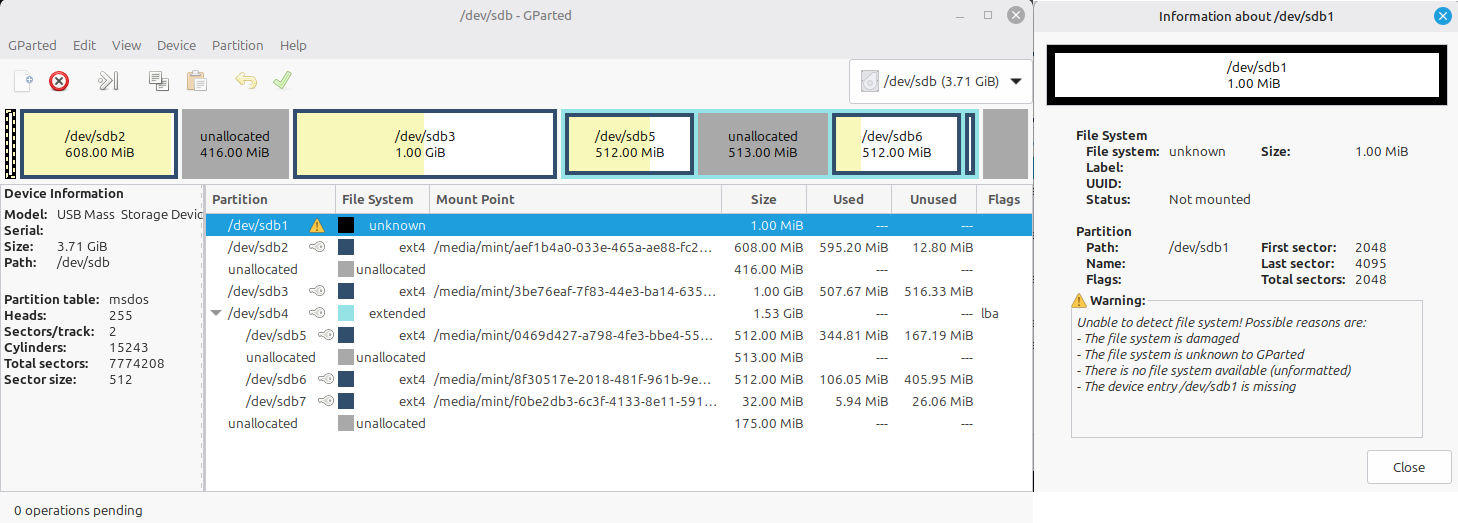
I also performed a check on all partitions and got this file as a result, there were no abnormalities according to gparted but after plugging it back to the PLC, the behavior remained the same.
Unknown partition is a special raw dataspace used for internal purposes.
Actually, sdb2 and sdb3 should be the same size — these are the two main boot partitions.
sdb5 is the reset type-2 recovery partition, and sdb6 is the PLC dataspace.
If I encounter such an issue on a PLC, I usually do the following:
Clone the whole microSD card with dd or another tool to create an exact recovery copy.
Expand sdb2 so that it has the same size as sdb3.
Perform a Reset type 2 using the hardware reset button:
Power off the PLC.
Press and hold the reset button.
Power on the PLC while holding the reset button.
Keep holding it until all LEDs turn orange (this may take up to ~30 seconds).
If the PLC enters the RUN state, update the firmware afterwards so that both sdb2 and sdb3 are updated. This requires two consecutive firmware upgrade operations via WBM or SSH, depending on the firmware version you need.
Sorry for the late update, I resized the partitions as you mentioned and performed a type 2 reset but no LEDs turned on, I made sure that I was pressing the button and kept pressing for more than a minute but nothing happened.