Hi all,
I want to add a method into my opcua server, I have been trying to follow the guide in this tutotorial CppExamples/Examples/OpcPlcManager at master · PLCnext/CppExamples.
I follow all the steps, but I get the BadNotImplemented error when trying to call the method from UaExpert.
Any idea of what I could be doing wrong?


Hello. That tutorial is a follow-on from the “simpler” tutorial, here:
GitHub - PLCnext/OpcUaMethods: Describes the basic steps for creating an OPC UA method for a PLCnext Control device. Describes the basic steps for creating an OPC UA method for a PLCnext Control device. - PLCnext/OpcUaMethods Did you manage to get that simpler example working?
Thanks for the answer! I haven’t tried that because I am looking for a solution that uses c++. Do you have any other examples with c++ I could try?
Ok, that makes sense. The simpler tutorial uses many of the principles that are needed for the more complex C++ implementation. If you’re able to get the simpler example running, then that will help to narrow down where the problem might be when you try the more complex example.
For the C++ example - are there messages in the Output.log file that confirm that your ACF component instance has started?
Yes, I do see that the component is active. I see the “Component ‘MyProjectComponent1’ from library ‘MyProject’ created.”
The error I see after I call the opcua method:
Arp.Services.OpcUAServer.Internal.InformationModel.Xml.NodeManager ERROR - Method for OpcPlcManagerComponent1/Stop.UA_MethodState not implemented
Perhaps the reference to the FunctionBlock is incorrect?
<MethodTarget xmlns="http://phoenixcontact.com/OpcUA/2019/NodeSetExtensions.xsd" FunctionBlock=“OpcPlcManagerComponent1/Stop”/>
I do see that the component is active. I see the "Component ‘MyProjectComponent1’ from library ‘MyProject’ created.That is not the correct component or library name.
These steps in the example:
image.png… should create a component instance named ‘OpcPlcManagerComponent1’ from library ‘OpcPlcManager.OpcPlcManagerLibrary’.
You are right, that was the wrong component. I do have the right name in the project (see image below)
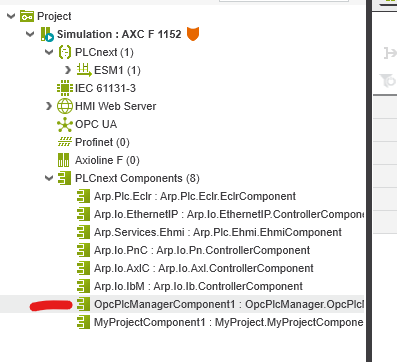
I have also tried to move the port to MyProjectComponent1 but I still get
Arp.Services.OpcUAServer.Internal.InformationModel.Xml.NodeManager ERROR - Method for MyProjectComponent1/GetPlcState.UA_MethodState not implemented
Ignore my last comment.
Moving the port to MyProjectComponent1 fixed the problem. I think that OpcPlcManagerComponent1 wasn’t active for some reason.
Thanks for the support!
You are right, that was the wrong component. I do have the right name in the project (see image below)</p>[https://forum.plcnext-community.net/uploads/VQIFM617Q8CE/image.png</a></p>However, I don’t see anything related to that component in the in the logs.</p>
ACF projects are not deployed using PLCnext Engineer, so that might explain why the ACF component instance is not started.
The file named “How_to_deploy.txt” that is created with each new ACF project includes information on how to deploy that type of project. This e-learning module also describes this process:
PLCnext Technology - Internal Function Extensions