I need to pass an array of string types to the PLC. The SDK port mode doesn’t seem to work.
Hello lixin, please send me the definition of Array of String types, I’ll verify this issue. Thanks! Best Regards, Eduard
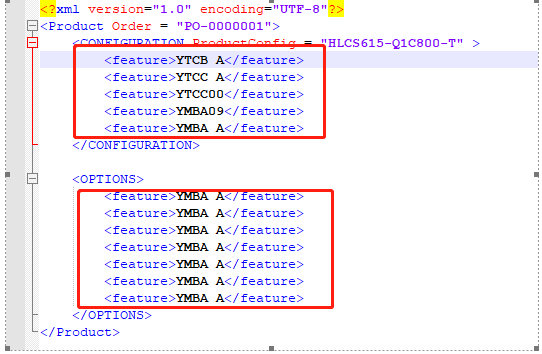
I’m using the tinyxml library, and I’m reading out the data in the XML file, and the GetText () output is (const char* type). The information in the red box in the XML file has been taken out by GetText. I want to package the data in the red box into an array and send it to the PLC.Please see the attachment for the picture const char* node1Name = xmlNode1_Name->GetText(); cout << node1Name << endl; TiXmlElement* brother = xmlNode1_Name->NextSiblingElement(); TiXmlElement* brother = xmlNode1_Name->NextSiblingElement(); while (brother)while (brother) { cout << brother->GetText() << endl; brother = brother->NextSiblingElement(); }
This works for me in 2020.0: This C++ program port …
//#port
> //#attributes(Output)
> StaticString myStringArray[10];
… can successfully be matched with a PLCnext Engineer IN port of this type:
TYPE
>     MyStringArrayType : ARRAY[0..9] OF STRING;
> END_TYPE
~ Martin.

Hello, is this googletranslate correct?
thank you for your help Today, I updated the software to 2020.0, but I defined a StaticString error report. See the attachment to the error report chart.
Are you building successfully?
Maybe it is only a issue of the eclipse Indexer?
The type StaticString should be available through the Arp Namespace i think kind regards,
Oliver
Can you give me a complete example to refer to? What kind of Arp Namespace do you build
Hello, Unfortunately I have just noticed that there is a typo in my earier code snippet, because this forum does not display angled brackets correctly (or at all). The port definition should look like this:  Here is a short video showing a complete example using Eclipse with the add-in from PlcnCLI version 2020.0 and the AXC F 2152 SDK version 2020.0. This example:
                                               * Creates a new C++ project using the Eclipse wizard.
                                               * Adds a single Program port, which is an array with 10 elements of type StaticString.
                                               * Successfully builds the project to create a library for PLCnext Engineer.
                                               * Opens the header file that declares the StaticString<> type. This header file is already included in the default Eclipse project.
Hope this helps. ~ Martin.

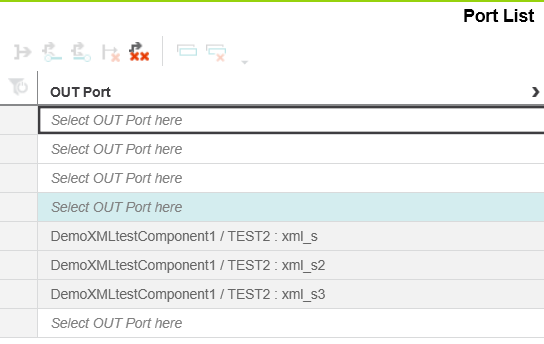
Hello Lixin, was the library in the engineer sucessfully replaced after rebuilding it?
Does rebuilding the Project help?
It should look like this.You can Notice at the Type if you are using a old “plcncli” tool or eclipse plugin.
WRONG:
Correct:
you can also Disable the Filters in the ProjectExplorer in eclipse and have a look at the intermeddiat/config/PROJECT.typemeta or intermeddiat/config/COMPONENT/PROGRAM/PROGRAM.progmeta Make sure you have the 2020.0 PLCnCLI installed.
After changing versions restart eclipse.