Hey, After setting up visual studio for debugging, this works great! It’s really easy to see what’s going on in a FB with this feature. But is it also possible to select an instance to debug? So if I have FB ‘example’ and I call example1 and example2 in my program, but I only want to debug example2 since the inputs are different. Is it possible to skip example1, or should I just go through the program until I’m at example2? With using it twice it’s not a big deal, but maybe if i’m using my FB more often it will be. Arne

Hey Arne, interesting question and short handed I’ve no solution for that. I’ll discuss with the develeopmend and keep this post updated. BR, Frank


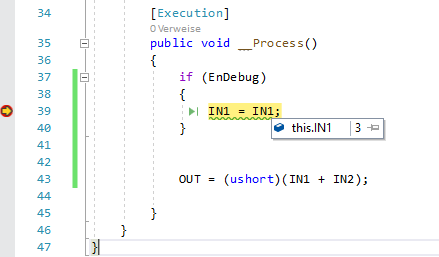
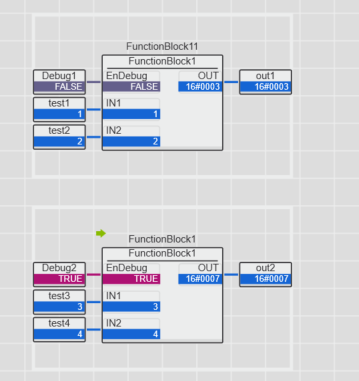
Hi Arne, sorry for the delay, but we’ve also needed a bit time to play around with a few approaches. So, the tricky point is to get the right instance reference, for this we’ve found two options. 1. Use a combination if 61131 and C# breakpoints. You could call right before the C# instance is going to be executed a breakpoint in 61131. When the breakpoint is called, you can add a breakpoint in you C# functionblock. - → As the 61131 application stops right before your C# instance is this the instance you will step into when you release the 61131 breakpoint. 2. The above method is a bit tricky, but no additional coding is required. Another alternative is to use an additional “enDebug” input which calls inside an if a NOP where you can add a breakpoint. Please check out the attached screenshots. Hope that helps, Frank