Somewhere I read that (on old FW at least) I could copy the output directory PLWE and directly copy it to the PLC.
(I assume one hat to do systemctl restart plcnext afterwards, or even reboot).
My question is: Does the compiled output contain config or profinet devices/ IP Addresses/ Mac adresses?
Every unit has the same device types installed, but of course not the identical mac adresses. So I try to find out how to actually make it deployable (and therefore: Update-able) at customer sides without using PLCNext Engineer.
We are investigating a script driven deploy and are in contact w/ Phoenix on that including auto-configuration of modules. If you are interested in cooperation on that ping me at ij@ivorjuechtern.de
The PN devices should be included in the project.
The IP address/Settings can be saved via the WBM.
The MAC addresses are not stored anywhere.
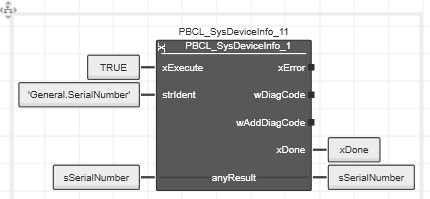
Each device has its own serial number, which can be used to identify it.
The PBCL_SysDeviceInfo function from the PLCnextBase library is suitable for this purpose:
By now I have written Scripts etc. that deploy the PCWE folder + change the station names + IP Addresses on the way + use DCP to scan for devices and setup them accordingly.
Only bottleneck right now:
If I want to (over-)write the project with PLCNextEngineer, it fails.
Brief summary:
Due to increasing security requirements, system access and functionality are being further restricted, making support for binary analysis and internal system structure mapping more difficult.
The previously described workaround is not officially supported and is therefore not recommended. For now, the recommended solution is to use the Update & Restore functionality in WBM.
Improving the handling and scalability of production machines is a high-priority topic internally, but although it is actively being discussed, there is currently no timeline for a solution and no short-term fix is expected.