I made a small test project to test out the REST API but now for no reason I can see, the traditional eHMI pages aren’t working. I dug deeper and looked into the files inside the simulated PLC, and “127.0.0.1:5050/ehmi/hmiapp.html”, which is the .html page that normally shows the eHMI is not in the PLC files at all:
image.pngThe REST API and my custom pages that use it don’t seem to be the cause (as I have remade the simulation from scratch several times, and in this case I haven’t copied the custom pages yet). Disabling user authentication doesn’t seem to help either (and I want to leave it in, even if it did).
The simulated PLC is indeed reachable, not only with WinSCP but I can also go to the web based management, or custom webpages when I copy them over without issue, so the webserver is working.
I don’t have a physical PLC to try it with, it hasn’t arrived yet. But I’m worried that when it’ll arrive I may have the same problem and I don’t seem to find a reason why this brand new test project in particular could be affected but not others I’ve made previously where I used the eHMI without issue.
Any ideas?
It sounds like you might have enabled the “REST Interface” on the HMI server page. If so, try to uncheck this option and see if your eHMI is visible.
Enable Rest.jpg
Well, yes indeed I have REST API enabled, that’s exactly what I wanted to test with this project.
But still, I tried your suggestion and it did generate the eHMI page correctly with REST API disabled (but my custom pages won’t be able to read variables without REST)
But then I re-enabled REST and again, eHMI page not getting generated on the PLC files. It should work anyways and the whole point was to be able to make a custom page that uses REST alongside the eHMI pages. Also, I looked around and default eHMI pages use a REST API to get its data from the PLC anyways:
image.pngSo OK, thanks to you we can narrow this to “eHMI pages not getting generated correctly when REST interface on HMI web server is enabled” but still, why and how could I fix it? I’ll try also testing further on an isolated environment to discard interferences from any other webservers or similar from other software.
Update:
I tried it in a brand new VM with a brand new install of everything and the exact same thing happens: eHMI files don’t get generated in PLC if REST API is enabled.
I tried writing them to PLC with REST API disabled, copying them to a folder in my computer, then writing to PLC with REST API enabled, then comparing the folders and manually copying them over. The eHMI does seem to work if I do that workaround, which makes me think even more that this is unintended behaviour and it should be working even with REST API enabled.
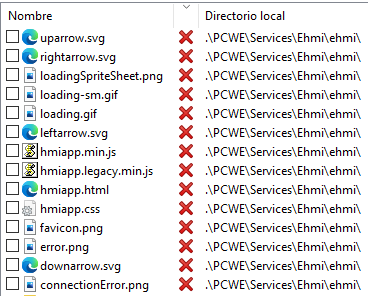
These are the missing files (in a basic test project):