Hello,
I wanted to know if it is possible to export data and/or variables from the plc in .csv or similar format. In particular if it is possible to do this via usb with a BWP 2043W web panel.
If we can, is there a way to export data from the plc, such as recipes and production data?
I think the PBCL_Param… function blocks in the PLCnextBase library might be suitable for this type of application.
OK, thank you. I looked at the library and saw a function (PBCL_FileCsvWrite_1) that saves a data table in a csv file. This file is saved in the filesystem.
How can I export or read this file via an external device?
There are a number of ways to transfer a file from a PLCnext Control device to another network device.
One option is to transfer the file to an FTP server using function blocks in the FTP library in the PLCnext Store.
Hello,
Do you manage to solve the saving of variables values in a file? I’m trying the Parametrization functions of the PLCnext Base but I don’t understand their usage.
Appreciate your help!
Hello!
Using of Parametrization fbs seems to be quiet simple. I suggest you use latest LST FW and IDE…
- Init PLCNext Base servise via PBCL_Setup_1. Otherwise you can’t interact with filesystem of plc. Additional steps covered by chm support file of the library.
- Single PBCL_ParamBackupMngt used in pair with amount of PBCL_ParamBackup. All PBCL_ParamBackup will store variables values to the single file. xExecuteRecover of PBCL_ParamBackupMngt will update all binded PBCL_ParamBackup varibles.


Hi,
I tried to use PBCL_ParamBackupMngt and PBCL_ParamBackup, without success.
I had no error, but no file is written.
- my first question is about ‘strPath’ of PBCL_ParamBackupMngt. Does the file need to be created, or is it created automatically if it doesn’t exist? Should I provide the folder path or the full path including the file? That is: ‘/opt/plcnext/retaining/UserBackup/backup.b’ or ‘/opt/plcnext/retaining/UserBackup/’ ? What is the extension? .csv or .ini?
- Does PBCL_ParamBackup accept only single variable or also structure?
Thanks
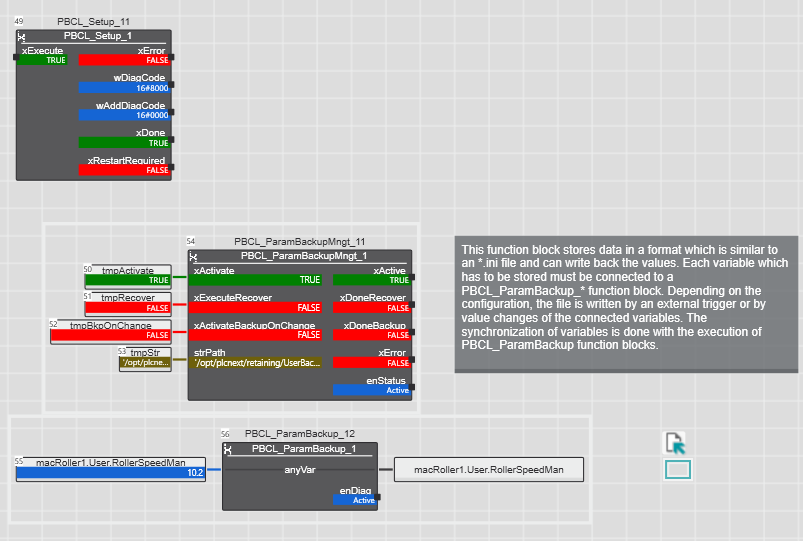
Hello!
As I know, structures is suitable for this bkp method. But it have to be tested for size limitation of internal buffers of FB itself.
Hi @alex_g, thanks for the reply! Do you have any suggestions for getting the code to work?
I don’t understand what I’m doing wrong and why it won’t create the file.
Probably, try to set TRUE to the xActivateBackupOnChange for a while…
and try to place file into /opt/plcnext folder or just write ‘./data_file.name’ in strPath.
BR