Hi Martin, is it possible to put the function block (and datatype) configuration in my C++ program so that they are shown under ‘function blocks’ when the library is loaded? What do i need to do to achieve this ? Best regards, Thomas
No, thats not what a program is. Read this thread to understand: https://www.plcnext-community.net/index.php?option=com_easydiscuss&view;=post&id;=2559&Itemid;=221⟨=en Use C# to make functionblocks for IEC  much easier
Hi Thomas, In future it will probably be possible to use the plcncli and/or Eclipse to create IEC functions and function blocks in C++, but I can’t say when that will be. Until then, the only things we can build for PLCnext Engineer in C++ are Components and Programs, and these will appear in the “PLCnext Components & Programs” section of the “Components” view in PLCnext Engineer. Martin.
Hi Martin, Arne, Okay, I understand.. would it be possible to create the function blocks using C# or IEC or some other way and then adding them to the library package compiled in C++ ? I don’t want to rewrite everything in .NET, especially when it’s not the preferred option for components/programs…
Would it be possible to create the function blocks using C# or IEC or some other way and then adding them to the library package compiled in C++ ?
No, I don’t think so. You would need to create two library packages - one containing C# function blocks (callable from IEC code), and the other containing C++ components and programs. C++ programs currently cannot call IEC libraries, including those written in C#.
I don’t want to rewrite everything in .NET, especially when it’s not the preferred option for components/programs…
I wouldn’t say that .NET is not the preferred option for Components and Programs. At the moment there are three options for creating Programs that can be instantiated in ESM Tasks:
1. IEC programs (in PLCnext Engineer).
2. C++ programs (e.g. in Eclipse).
3. C# programs (in Visual Studio).
Currently there are different features and benefits of each of these, but I wouldn’t say that one is preferred over the others for every case. It depends on the requirements of each project. Martin.
Looking at the C# tools, it seems i am unable to install the required dll files. Installed VS2017 Community, downloaded the zip “PLCnext Technology Development Tools for Visual Studio” When installing i get an error about invalid chars in a path. Any idea how i can solve this? I tried referencing the dll’s inside the .msi (after extracting) but I also ran into errors there..
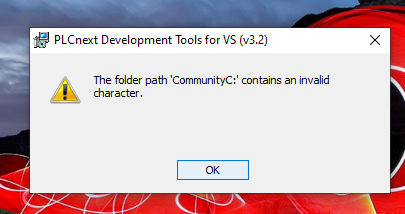
Try to use another folder, I think it can’t contain ‘:’
thx for the suggestion but ‘:’ in foldernames aren’t possible on win fs anyway.. even on C:\\ renamed to PLCnext.msi it doesnt work so it seems like it has got nothing to do with the path/name. (also: Windows SmartScreen complains about it but I chose ‘execute anyway’)
Hi Thomas, This is a known issue with this add-in - please see this thread for a discussion and a work-around: https://www.plcnext-community.net/index.php?option=com_easydiscuss&view;=post&id;=2788&Itemid;=224⟨=en Martin.