When testing the options for control of a frequency inverter via ProfiNet, I have noticed some “minor” issues. The import of the GSDML file has worked without any issues. But when I tried to access for example the control word of the inverter to link it to my variable created in the program, I was not able to find the inverter variable. After a short call to our local support from Phoenix Contact, we noticed that the Control Word definition from the GSDML file is for a OctetString[2]. This is nothing new as it was the same for PCWorx. The issue now is that PCWorx Engineer is not able to read the OctetString[2] as word anylonger. Instead we have to generate a ARRAY[0..1] OF BYTE to be able to assign the PLC variable to the inverter variable. Why do we have now to go this way? Or is there a meaning behind this, that I’m not able to see. Peter
Hi Peter, I will check this with the Product Manager, but it may simply be that this feature is scheduled for inclusion in a future release of PC Worx Engineer - I’ll let you know. Is it possible for you to send the GSDML file that you’re using, so we can reproduce the problem here? - Martin.
I have send the GSDML file to Uwe Stappel and Dan Møller her in Denmark. Just to make sure, I have tested it also with some barcode readers and different frequency inverters (Lenze; Danfoss and KEB) - it is the same here. My guess is also that we will see it fixed with version 7.3 after the SPS and Drives. But a small reminder doesn’t hurt. Peter
Hi Peter, I’ve had a callback on my desk but was interrupted all the time… However, now I’m following a boring TV series, so I can directly answer your request  . As you already guessed is this function now integrated inside the upcoming PC Worx Engineer Version 7.3, I’ve tested this in a current sprint release and it worked well with one of your GSDML files. Greetings to Denmark cu Frank
Hi Frank, no problem at all. I have also had a bit more work then I had ask for and could not check the status before tonight. I was already thinking that we will have to wait for the release in November. That said: One small issue I have with PCWorx Engineer is, that you have to reinstall the GSDML files every time you start a new project. Is there a plan that we can have a one time install in to PCWorx Engineer and then just call the component when needed without re-installing the GSDML file? For the moment I’m just trying the software in different cases in preparation for the change next year. as for now I have marked 5 projects as pilot projects for using PCWorx Engineer. 3 Projects with the AXC F 2152 and 2 with the RFC480S. There is two more but there I was using the AXC3050. But now I may use the replacment controller when I can get it in time. Ok Frank! Thanks for the replay and we talk later again. Peter
Hi Peter, The answer to your question:
Is there a plan that we can have a one time install in to PCWorx Engineer and then just call the component when needed without re-installing the GSDML file?
Yes, this will be possible with the next release in November 2018. - Martin.
Hi Peter, The “Device Library” feature of the current version of PC Worx Engineer might also be useful in this case. From the help system: 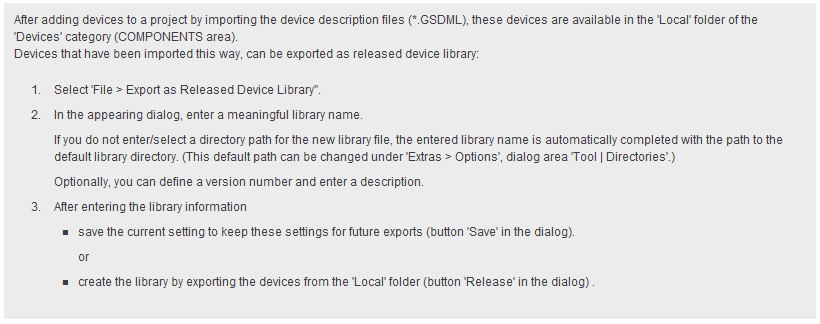 The Device Library created in this way can then be imported into other projects, without needing to import the GSDML file(s) into every project.