Hi All, I am looking for someone to explain to AXL F SGI2 1H configuration in PLCNext Engineer to me. I have the proper characteristic value in micro volts / volts as well as the nominal load (tried both in kg and lbs.). If I divide the raw value that is taken from IN01, the channel reading the measured value as an LREAL, the weights just don’t make sense. They are not equivalent to what I have on the load cell itself. What is happening behind the scenes? Can someone explain how the nominal load and the nominal characteristic value affect the code and the measured value spit out? Thanks
Technical information on that I/O module is contained in the Data Sheet, which you can download from the Phoenix Contact website. I have also attached it here. The IN process data you can see in PLCnext Engineer is described from page 18. On page 19 is a description of the “measured values”, including an example. The 32 bit input value should be treated as an integer, not as a real value. There are people in your local Phoenix Contact office who can support you with the use of this I/O module, if necessary. If you would like me to send you their details, please let me know.
How to reset AXL F SGI2 1H module settings? Manual says: 15.5.3 Reset parameterization (002Dhex: ResetParam) This object is used to reset the module to the default settings. How to access this param?
You can use the PDI_WRITE function block in PLCnext Engineer to perform that function. There is information on that FB in the PLCnext Engineer help system. In this case the INDEX parameter on the FB should be set to WORD#16#002D, DAT_CNT should be BYTE#16#01, and SD_1 should be an array of bytes with the first element set to BYTE#16#01.
Thx, settings reset is working. Now I want to calibrate weighter. I use AXL_SGI_6 library. I set Zero point and got 0kg. When I put 1kg on the weighter i got a little bit more (1018 instead of 1000). 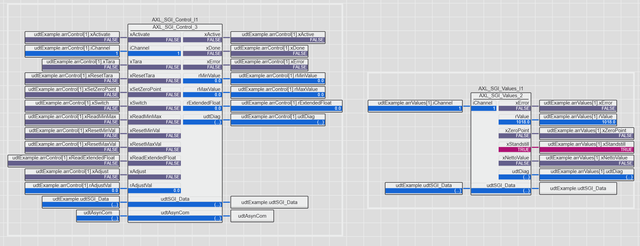 I want to adjust second point. So I set the adjustment value to 1000.0.
 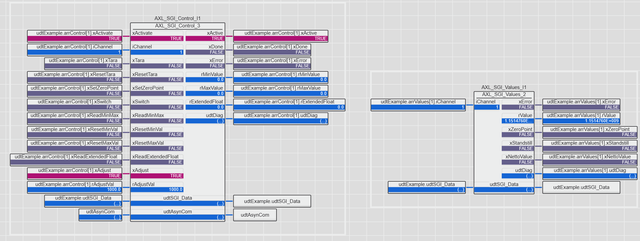 And instead of 1000 got 1.1488884E+009. What I’m doing wrong?
Hi bigstuck, This behaviour has now been confirmed as a bug in the current version of the SGI_Control function block. This bug will be fixed in the next version of the library. I am waiting for confirmation, but I believe that you should be able to use the following work-around: - Add a TO_REAL function to your worksheet. - Connect the output of the TO_REAL function to the rAdjustValue input on the SGI_CONTROL function block instance. - Connect the following constant value to the input of the TO_REAL function: DWORD#10#1000000 (i.e. 1000 grams x 1000, in base 10). This should allow you to set the measured value to 1000.0 grams when you have a 1kg weight on the scale. Of course you can change the DWORD value to anything else you need - just multiply the value in grams by 1000. Please let us know if this works, or not.
Many thanks to you. It works.
Hello, I also have a question about the AXL F SGI2 1H. We allready used one module, but now for a new project we used two. How can I selected the first channel of the second module in the AXL_SGI_Config bij iChannel ? I only think you can fill in 1 our 2. Can you please help me ? And tell me also what i should change also ? Thank you
Each SGI AXL module needs its own FB instance. Each of those FB instances must be linked to the process data for one SIG module. Please let us know if this helps, or not.
Where can I link the module to the FB ? Thank you
The arrInputPD and arrOutputPD parameters on each AXL_SGI_Main function block instance must be linked to the process data from a single SGI module. With two instances of this FB, two SGI modules can be used.
Hello I am also having issues with an SGI2 module. I have an underrange error on channel 1. Therefor channel 2 does not work aswell. But what is meant with underrange? The cabling is OK because it works on another SGI module. The Control FB throws error C511 ‘Channel inactive’, probably because the Main FB throws the C213 ‘Underrange’ error. I can’t find any clear explanation on this error, not in the help for the FB’s nor in the manual for the SGI modules. Thanks in advance!
Here is the answer from the library developers, who you can also reach using the “Contact” button on the SGI Library product page in the PLCnext Store: [quote]The error comes from the SGI moudule via the processdata. The error of the Control FB is because of the error of th Main FB. Please try to set the device parameters over the startup parameterization to parameterize the device.[/quote]
We have an INIT program running on startup to parameterize the device. There are 2 SGI2 modules in our rack with exactly the same parameters. The 2nd one works perfect, but the first one keeps throwing the underrange error. Indeed the error ‘C213 - Underrange’ is shown in the diagnostics of the Main FB.
This could be a problem with the field device, or the wiring, or the Axioline SGI module, or the PLCnext Engineer program (or something else I haven’t thought of). Someone from your local Phoenix Contact office will get in touch to help troubleshoot the problem.
We just switched the 2 hardware modules and the problem follows with the module. So parameterization is OK I think. Cabling is OK because it works on all other channels. We are actually suspecting a faulty SGI module, specifically a faulty channel. Deactivating channel 1 makes channel 2 work on that module.
Hello,

I work now for a couple months with the AXL_SGI_Config and it works very good but to day i cant set a new weight.
I have 2 channes and on th first channel i don’t have a xConfigValid what can it be ?
In this case the uiCharacteristic value you are passing to the function block is wrong. Please see the documentation for that function block. Someone from your local Phoenix Contact office will contact you to discuss this.