Hey people. It seems I have really messed up. - AXC F 2152 Rel. Can. - Newest firmware (version 1.01). I accidentally started the PLCNext wihout an SD card inserted. After noticing my mistake, I shut off the power supply, insterted the SD card, and enabled the powersupply again. The controller won’t boot anymore. The boot LED keeps flahing red (2Hz), and the D LED is contnuous orange. Strangely I can access the filesystem with a terminal, but after about five minutus the PLCNext initiates a shutdown command, it shuts down and I dont’t have access anymore. After disabling, and re-enabling the power supply again, I cannot acces the controller anymore via terminal. The LED inincations are identical to the above. What I have done a couple of times now, is shut off the power supply, press the reset button, enable the power supply, wait about 30 seconds untill all LED’s are orange, and then let go of the reset button. After doing that I can access the controller again via terminal, but again only for five minutes and the pattern repeats. The LED’s keep doing the same as desribed above. (boot flashing and D orange continuous). Then I thought maybe I need to do another firmware update. (re-update so to speak). The five minutes time I have, are enough to upload the .roucb file and initiate the command. However, when commanding sudo update-axcf2152 I get an error ‘ERROR could not stop PLCNext firmware’. I attached the error as an image to this message. Also, calling the axcf2152recovery does not seem to work. (/etc/init.d/axcf2152recovery.start). What can I do or try? Is my kernel damaged or something? Please note that te software on the SD card was not changed at the time it wasn’t installed in the slot. The project on it was running fine before. Hope you guys can help. Regards, David.
Hey David, maybe something on your SD was damaged.
What might help is: put your SD into a cardreader and delete the working and upperdir.
reinsert the SD and power up the PLC. (these directorys will be created again when booting.) be carefull not to delete the license folder. Also please upload a /opt/plcnext/logs/Output.log file if it keeps crashing.
Hello Oliver. That has not helped. I can’t access the controller at all anymore. That is, winSCP and putty state that the password is incorrect. I did not remove the licenses folder. The LED indications remain as described. David. --EDIT-- I can access the controller, but the printed default password has changed to ‘admin’.
Hello David, deleting those folders will result in a factory default → now the printed Password and the admin user should be valid again. Your modifications will be lost. The strange part is the flashing boot LED. flashing continuosly or is there a pattern?
This indicates that something is going wrong with mounting the SD. Edit:
Regarding the admin:admin Issue I will look that up.
Might have something to do with the factory reset functions you executed.
The LED is flashing continuously at 3Hz. Also, a logfile is not created in /opt/plcnext/logs. (The logs folder is not even created). You might be right, looks like the kernel can not access the SD card or something…
Hey, please check with the “dmesg” command if there are any indicators or post the log here.
log of dmesg is in the attachment of this message.
Actually the dmesg looks fine.
with df- h you should find the SD mounted at rw? “/dev/mmcblk1p* 1.9G 10M 1.7G 1% /media/rfs/rw”
can you upload the:
/var/log/messages & boot What you can try to do is
1.) login with “root” (might have to create root user with “sudo passwd root”)
2.) execute “recover-axcf2152 2” this will set back to shipping FW.
3.) wait for it to boot up again.(might take a while(2-3 min) . it will blink some time stop shortly and boot up again)
4.) copy FW 1.1 with winscp
5.) execute the “sudo update-axcf2152” as “admin”
I would really like that option, I can’t because the error I get is; could not stop PLCNext firmware.
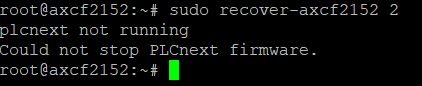
Hmm well I guess the script has to be modified to execute also when plcnext is already stopped. maybe you can manually start the plcnext runtime for now “sudo /etc/init.d/plcnext start”
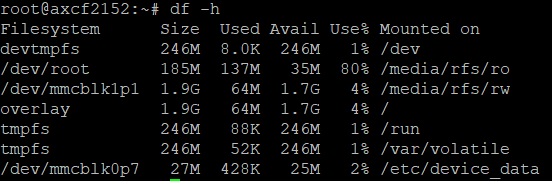

yes it is normal that it reboots once then it takes a while to copy the recovery image. please do not power it off during that process like I said it might take 2-3 minutes to reset the system. can you upload the log files located at
/var/log/messages
&
/var/log/boot also check if the /opt/plcnext/logs/Output.log file was created now … When you manually start the plcnext Runtime does the RUN and BFs LEDs light up? Also take another look at the SD with a cardreader if there are still no new folders.
maybe you have accidently pushed the SD hardware Writeprotection/ Lock button into position?
Starting the PLCNext service manually, using sudo will stop the blinking of the boot LED. It will completely turn off. The RUN LED however does not turn on. Also, when issuing the plcnext start command, I keep getting the warning that /dev/pts/1 ‘operation not permiitted’. Running htop, I can see that the main computing power is used for a command ‘if=dev/mmc of=dev/mmc’. I added the htop printout to the attachment.

yes that dd means that the backup image is currently beeing loaded…
so recovery is still in progres…
I did wait about 5 minutes when trying to recover the factory FW. Nothing happened. Also, I checked the SD write protection button. No problems there either. I did manage to get the log files you requested. I attached them to this message. David.
yes that dd means that the backup image is currently beeing loaded…
so recovery is still in progres…Okay, I will leave it running for 30 to 60 minutes. Hope it will recover. I’ll report back later. Thanks for all your help and support! David.
So… left it running for 60 minutes now. I still am letting it run, did not touch the power supply. It is still is in this state: - BOOT LED blinking (2Hz or 3Hz)
- D LED continuous orange
- No access via terminal, can’t ping the device. (Ethernet LED on the bottom is blinking though). Are there other things I can try to bring it back to life? Regards,
David.
I just had a little thought. Is there a possibility that the kernel lost it’s access rights to some of the files and folders on the SD card? I got to this thought because when I ran /etc/init.d/plcnext start I got an error ‘acces denied’ (or something close to that error). Is there a sudo chown or sudo chmod command I can run to regain access to the entire SD or directories thereof, to test my theory? What do you guys think? Does it seem plausible? Regards, David.
Hi David, If you can give us a ring, i’ll gladly take a look so we can sort this out. Kind regards, Vincent
Sorry to resurrect a very dead thread, but was there ever a final resolution for this issue? My PLCNext controller is presenting with the same symptoms.
Boot flashing red, 3Hz
D solid yellow
Cannot ping