Hi, I’m using PLCNext engineer 2026.3 on an EPC1502 with firmware 2024.0.9 LTS. I’ve the following 2 questions:
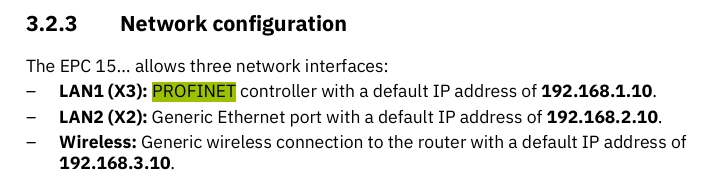
How can I disable Profinet DCP trying to set my device’s network settings? I have only the Profinet Device service active, and am receiving data well. But when a DCP request is received, trying to set the device’s network settings for X2, it falls back to the default 10.10.10.2 (this is written to /etc/network/interfaces) and on a subsequent reset my network settings are lost.
The OPC-UA Server background service keeps crashing. (Client and PubSub services are disabled.)
In the Notifications Logger I get “Error while starting the OPC UA Server. Please check the configuration for problems e.g. with the endpoints or other settings” and in /var/log/error:
Mar 26 10:14:27 epc1502 Arp.System.Application: Arp.System.Acf.Internal.Sm.ComponentsController ERROR - Exception occurs while starting component ‘Arp.Services.OpcUAServer’: Exception of type ‘Arp::System::Commons::InvalidOperationException’ was thrown
Cannot start OPC UA server: -1
at Arp::Services::OpcUAServer::OpcUAServerComponent::StartUA()
at /usr/lib//libArp.Services.OpcUAServer.so(+0x3a5fed) [0x7fa3f6f78fed]
at Arp::System::Acf::Internal::Pm::ProcessManager::StartComponent(Arp::System::Acf::IComponent&) const
at Arp::System::Acf::Internal::Pm::ProcessManager::StartComponent(Arp::BasicString<char, std::allocator > const&) const
at Arp::System::Acf::Services::Internal::ProcessManagerServiceImpl::StartComponent(Arp::System::Rsc::Services::RscString<512> const&)
at Arp::System::Acf::Internal::Sm::ComponentsController::StartComponent(Arp::System::Acf::Internal::Sm::Data::ComponentExecutionData&)
at Arp::System::Acf::Internal::Sm::ComponentsController::StartComponents()
at Arp::System::Acf::Internal::Sm::SystemManager::SetupSystem()
at Arp::System::Acf::Internal::ApplicationBase::Main(int, char**, Arp::System::Commons::Diagnostics::Logging::LogLevel)
at Arp.System.Application(+0x3f6cc) [0x55c4808e86cc]
at /lib/libc.so.6(+0x2d57b) [0x7fa42561e57b]
at /lib/libc.so.6(__libc_start_main+0x80) [0x7fa42561e630]
at Arp.System.Application(+0x372c5) [0x55c4808e02c5]
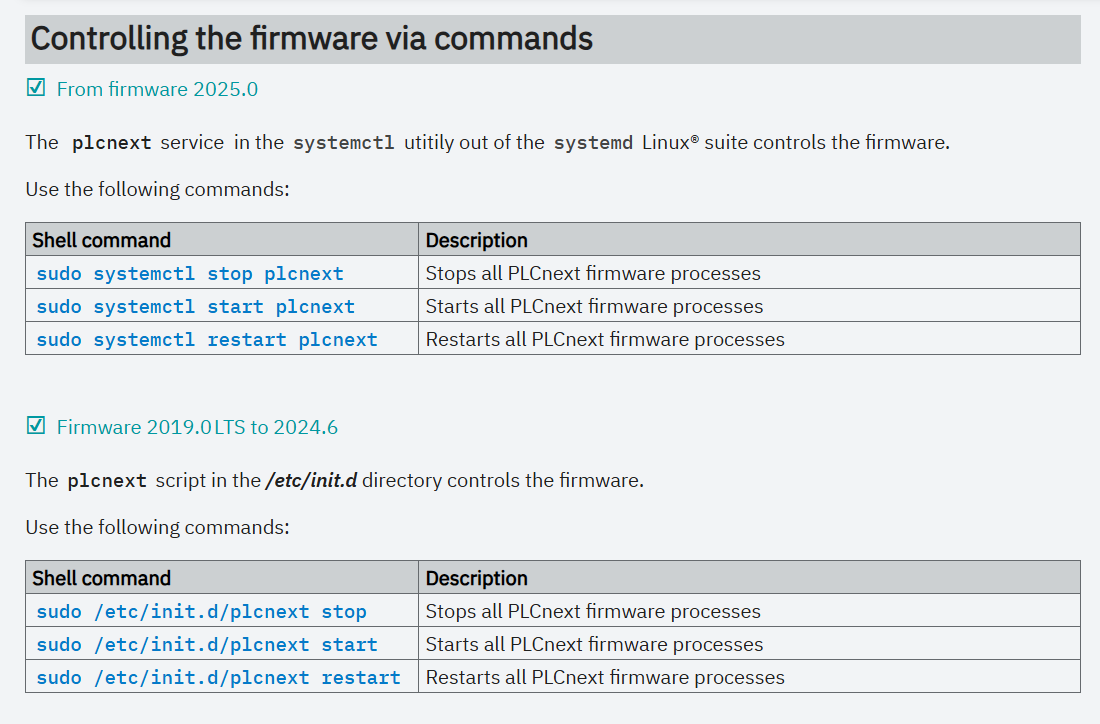
I also don’t know how to try to restart the OPC-UA Server service from /etc/init.d/ ?
Also, the default IP address for LAN2 (X2) should be 192.168.2.10
Maybe you should do a factory reset and try this again.
I recommend using the PLCnext Engineer 2024.0.4 with libraries compiled for it.
Are you using OPC UA in your project?
If so, do you have some logs from the cliet side?
If not, you can disable it.
To me, this looks like a problem with the configuration of the Profinet Controller.
If I remember correctly, the Profinet controller is configured with the Name and IP address of each Profinet device on the network. If the controller sees a device on the network with the correct name but the “wrong” IP address, then it will use DCP to “fix” the IP address. This is a feature of Profinet, not a bug - it allows, for example, the replacement of a device on an active network without needing to know or manually set the IP address of that device.
In this case I suspect that the Profinet Controller has a configuration that includes the EPC1502 device with an IP address of 10.10.10.2.
@avladut
I’m using X2 for profinet because the EPC1502 is used as Device in this application (from system services, PN controller is disabled, PN device enabled). X3 is for PN controller usage.
The network IPs and structure are given, not freely reconfigurable, so I can’t change to 192.*
OPC-UA: yes, we need to use the EPC1502 as OPC-UA server, and I am getting those specific errors I posted when the service starts up. Client-side logs are non-existant at this point: the EPC1502 OPC-UA Server service dies, so the client side has nothing to connect to to produce any logs.
@Martin_PLCnext_Techn : the controller is a S7 PLC. We tried to look everywhere, all the network configs look ok. But when the DCP comes in, it says it tries to set the GW to the same IP as the EPC1502, and that’s why I think it “falls back” to 10.10.10.2 ?
You should use LAN1 also for PROFINET device.
Just swap the cables and network configuration between LAN2 and LAN1.
Like @Martin_PLCnext_Techn said, please check in the PROFINET controller (SIEMENS) that the PROFINET device (EPC1502) default gateway is set and has a different IP than the IP address of the device.
The Profinet standard mandates the use of DCP in every Profinet device. Since a compliant device cannot have DCP disabled, there is no mechanism to do this in a PLCnext Control device.
The OPC UA server is not run as an init.d (or systemd) service, which is why you can’t find what you’re looking for. Instead, the OPC UA server is run as a component of the PLCnext Runtime service. It’s not possible to enable and disable the OPC UA server component without restarting the PLCnext Runtime service.