Hello,
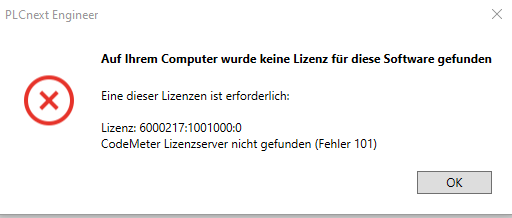
after the installation of PLCCNExt VErsion 2024.6 i get the following error message - CodeMeter License Server missing Error 101

Hi mrbeuer,
thanks for your reqeuest, as obviously the service is running there seems to be some other issues.
The CodeMeter runtime does create some logs, but those does not belong to a public forum.
I’ll come back to you by mail.
BR,
Frank
I have the same issue even with PLCnext 2023.0.5-LTS. Do you have any solution for it ?
Perhaps cause Issues after Windows 11 24h2
1. Verify ownership of license key, Release the license.
2. Uninstall currently installed Codemeter runtime version
3. Restart PC
Then with admin rights the latest version Codemeter runtime :
User Software - Wibu-Systems Here you can find Runtime software for Wibu-Systems products CodeMeter and WibuKey for Windows, Mac and Linux operating systems. 4. If necessary, restart PC after installation
5. Activation of the license key
License management via server. Codemeter runtime version checks server and client, ideally the same version is installed on both sides.