Hello, i wanted to reconstruct the simulink model of the tutorial ( https://www.youtube.com/watch?time_continue=1&v;=4eEvbAug7rs ). I use Matlab 2018a. Unfortunately after pressing on “Build Model” in the task editor an error comes in the end of the dialog box: Error: File: C:\\Program Files (x86)\\Phoenix Contact\\PC WORX Target for Simulink V1.30\\pxc_hlli\ tw\\pxc_next.main.tlc Line: 798 Column: 40Unable to find Members within the CGType scope So no model is created to import it later in the PC Worx Engineer. Can you tell me what to do to? Marius
Hello Marius, You must use MATLAB/Simulink version between R2012a and R2016a, as mentioned in the table from the User Manual shown below. Unfortunately Mathworks significantly changed the APIs on their software after R2016a, so at the moment our software only works with the earlier releases. Can you please try one of these version of MATLAB/Simulink, and let us know if you find the same problem? 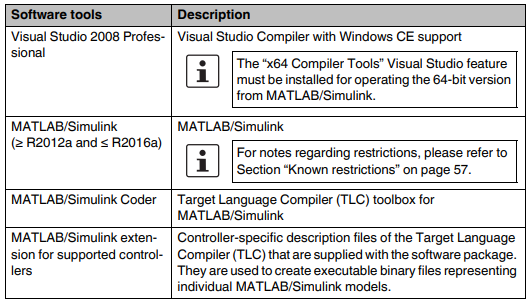 - Martin.
 It can not find MATLAB R2019a(Chinese language version) on my computer! How can i do for it? Chengxue

Do you have the other two pre-requisites installed - Simulink and Simulink Coder?
