Does anyone have a fix for ProfiCloud issue where if the connection drops between the 2152 and the network, and reconnects later, ProfiCloud will freak out and I have to delete the dashboard and create a new dashboard. This is a super annoying issue because I usually have to turn the 2152 off and on, delete the appliance from ProfiCloud TSD manager, re-add it, and create a new dashboard. Is there a way to have it automatically reconnect and continue to receive the data from the 2152?
Hi ngreene, I have tried your scenario: 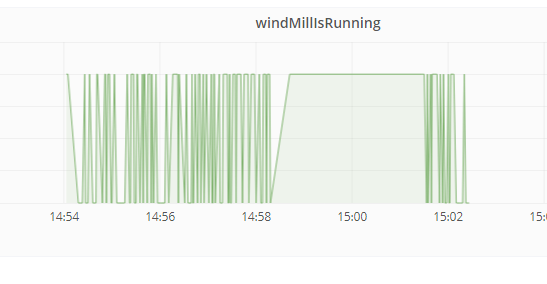 as you can see, at 14:58 I have pulled the ethernet-cable, and 3 min later i’ve reconnected it. Can you share some more details regarding:
                                               * details from your application
                                               * FW version on the controller
                                               * Type of data
                                               * Way of disconnecting the connection
                                               * perhaps the application and your metrics.json
                                               * export of your grafana-dashboard used
Cheers
The application is turning analog sensor inputs to actual values and sending them to ProfiCloud as REAL variables. The firmware of the PLC is the latest one avalible on the website (1.01?) Attached is the metrics file being used. I see that you are unplugging the network cable then reconnecting. My issue is that it freak out after a reboot of the PLC. Unless the two are essentially the same thing, then I think that’t why your’s reconnects just fine while mine has some problems. I cant attach the metrics.json file so I’ll just paste it here: [
{
„port“ : „Arp.Plc.Eclr/THF1:TempReading“,
„metric“ : „TempReading“
},
{
„port“ : „Arp.Plc.Eclr/THF1:HumidReading“,
„metric“ : „HumidReading“
},
{
„port“ : „Arp.Plc.Eclr/THF1:FlowReading“,
„metric“ : „FlowReading“
},
{
„port“ : „Arp.Plc.Eclr/THF1:VoltageReading“,
„metric“ : „VoltageReading“
},
{
„port“ : „Arp.Plc.Eclr/THF1:PressureReading“,
„metric“ : „PressureReading“
},
{
„port“ : „Arp.Plc.Eclr/THF1:FreqReading“,
„metric“ : „FreqReading“
}
]
In case it helps, I had a Proficloud TSD demo set up a while back that was logging a single Integer value to the Proficloud from a PC WORX ENGINEER project. When I needed to move the demo I just turned off power to the PLC and powered it up at the next location. I don’t think the PLC ever had any trouble re-connecting to the Proficloud TSD service, and the dashboard just showed a gap in data when the PLC was powered off. Out of interest, what do you mean by „freak out“? What are the symptoms you’re seeing? - Martin.
It pops up a bunch of errors on the right hand side of the window. It wont reconnect after a power down so I have to delete and create a new dashboard and/or completely remove the appliance and add it again. I left the system running through the the weekend and it kept up just fine. No errors, no drops; so that’s good. Sorry for not using technical terms. (._. )
I shut off the PLC around 630am and turned it back on around 8am. Its been 15 minutes and the graph wont update with the values. UPDATE: Here is a screenshot of the error I’ve been getting. UPDATE: The issue is related to the PLC not retaining the DNS settings after a power cycle. NOT on the ProfiCloud side.


Hi ngreene, the error of the second screenshot you get when you are around 10 minutes inactive in grafana/proficloud and you have to relogin. If possible, save your work as often as you can. We will check if it is possible to raise the timeout. For your problem with no incomming data. Do you see that the data arrives at the proficloud? What do you see if you open up your device on proficloud, when no data is provided to grafana? Regards, Dennis
After playing around with it for a while, I did come to the conclusion that my issue was not on ProfiCloud but on the PLC side. If my PLC turns off and back on, I have to go back into the PLC (SSH) and do the whole „echo nameserver … > /etc/resolv.conf“ thing. Thanks for the explanations guys.