Hello!, I was wondering if someone can help me with this problem.
I installed plc next engineer 2002.0.2 , and then I installed Simulation_Setup_AXCF1152_2022.0 but when I try to connect to simulate the program , I have this error. Does Anyone know what is this?

Are all the requirements met on the development machine?
PLCnext Engineer Simulation The PLCnext Engineer Simulation makes it more convenient to test and optimize your PLCnext Engineer applications, because developers no longer depend on a hardware target attached to their computer.
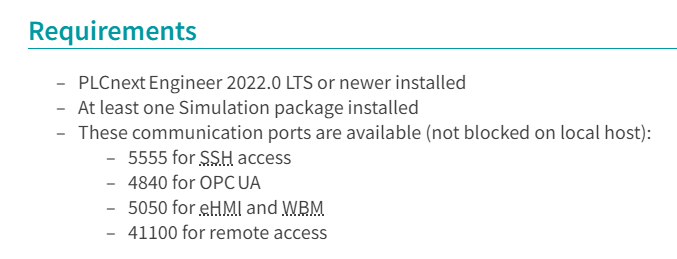
I’ve the same problem and found out that UDP port 5050 is already used.
netstat -aon |find "5050"
But I’m not able to stop the process because it’s System
Is there a way to change the needed port?
Sometimes it says System but it’s actually a process you can close using the port that’s conflicting with PLCNext simulation. I know because I’ve done that and it said “System”, but then by trial and error I found the culprit (in my case it was OPC UA Local Discovery Server). How to find other than just trying like I did though, I do not know.
But something I recommend when working with PLC programming software, PLCNext or others, is try to make a Virtual Machine for it if you can to keep it in an isolated environment on its own OS install. Really helps avoid this kind of conflicts where one programming software or the other, or related software (like OPC servers like Martin said) start misbehaving with each other, among other things. It is quite a bit more involved though
Hello, we recently started using the simulator at the university, but on my personal computer it gives me the same error. Could someone guide me on how to solve the problem?
Hi. Do you know whether the problem is caused by a blocked port on the PC that’s running the simulation?
(you can use netstat commands like the one shown above to check that each of the required ports is free).
The most common problem I’ve seen in cases like this is that the PC is running an OPC UA Server as a Windows Service, that uses port 4840. The solution in that case is to stop or uninstall that service, which should free up the required port.
Hi @Martin_PLCnext_Techn , are those ports 4840, 5555, 5050 and 41100 should be requested to be configured to be TCP or UDP?
Thank you.