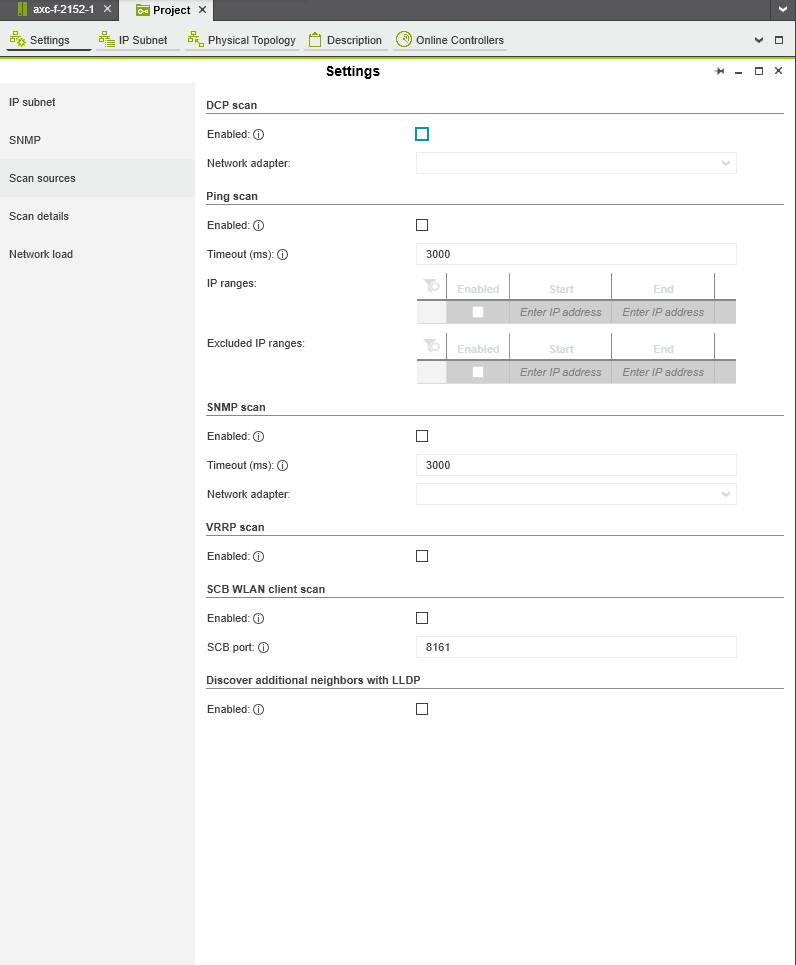
I am running into an issue where I am not able to scan for devices when I use a USB to ethernet converter, or connecting over a VPN. From what I have read this is probably because it does not support the broadcast message required for the profinet scan.
I can however ping and reach the device through these interfaces. I would like to use something like the ping scan, but this seems to fail with a popup stating ‘Could not communicate with the Profinet stack‘. I do not see an option to disable the profinet scan and I think this might be the reason that it does not get around to the ping scan.
Could someone confirm this suspicion or give me some lead on how I could find a way to solve this?
Hello, I know about the ping scan. It however looks to me like it does not get to the ping scan, or other scan methods when I enable them if the profinet scan fails. I would like to know if anyone can confirm this suspicion, or if someone knows how to get the ping scan to work when the profinet scan does not work
When you use the “Online Devices/Controllers” editor it exclusively uses Profinet protocols (DCP) to assign IP/Subnet/stationame/Function/Location data.
The settings “Scan sources” (screenshot) apply to the “Physical Topology” edtior.
Ahh thanks, things are starting to make a lot more sense. Unfortunately I do not have the physical topology tab available, do you know how I could access this?
And is it possible to assign the ip from this topology tab, or would I need to go to the WBM to set the IP in this case?